On cellular, offloading books to iCloud and preloading the next book wait for Wi‑Fi. No mobile data is spent on them.
What waits for Wi‑Fi
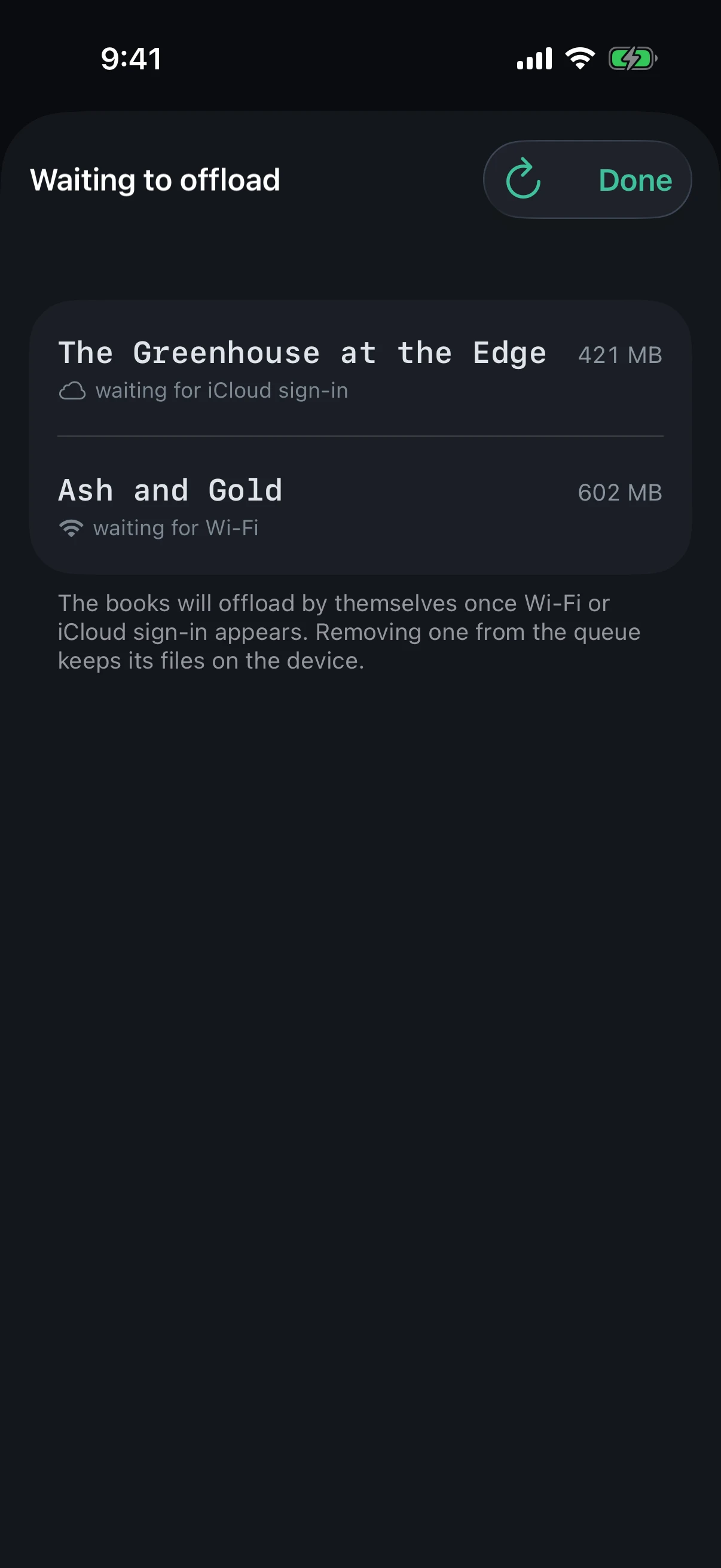
Offloading to iCloud — from the book’s menu, after you finish it or with an operation in “Storage”: the book joins the “Waiting to offload” queue marked “waiting for Wi‑Fi” and moves by itself once Wi‑Fi appears — if the app is running at the time, otherwise the next time you open it.
Auto cleanup: books it would have removed on cellular stay until the next run.
Preloading the next book, which “Preload Next Book” starts at 80 % of the current one: it begins once Wi‑Fi appears, if you are still listening to this book.
What does not wait
“Download” — bringing a book back from iCloud — and fetching chapters of a book you started playing: you can listen to offloaded books on cellular too.
Sync and the catalog backup: the switch does not touch them.
What counts as cellular
Cellular data and Personal Hotspot: Wi‑Fi shared from another phone waits too. The app itself does not go online: Apple services handle the network.
Values
Default
Off: offloading and preloading run on any network.
Sync
Does not move: each device has its own value.
What it looks like
The book is waiting for Wi‑Fi: it is not offloaded on cellular
Tip
A book waiting in the queue can be removed by swiping left — “Remove from queue”: its files stay on the device.