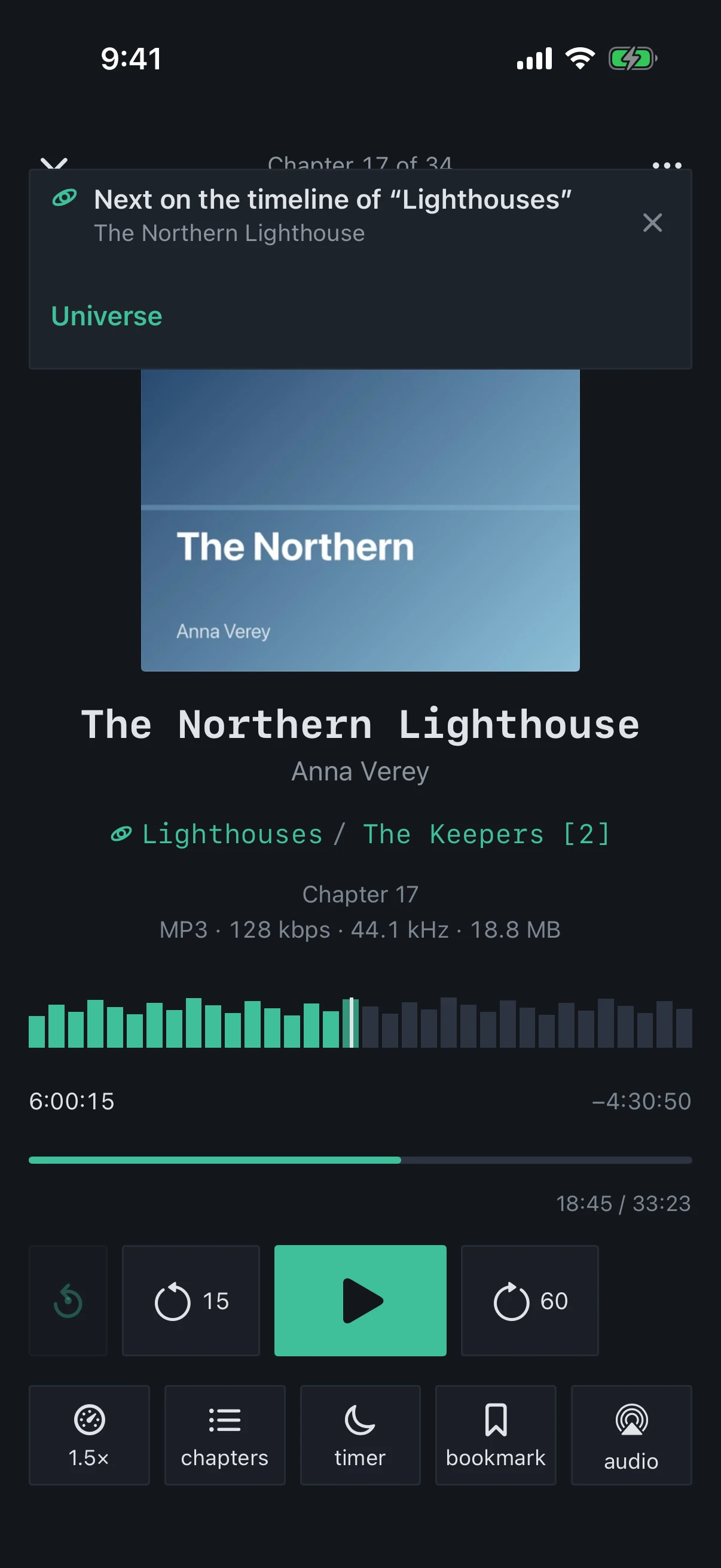
A book plays to the end and the next one starts right away. Which one is decided by the series, and in a universe with a timeline, by the timeline.
Which book is next
A book in a universe where “Next follows the timeline” is on, and it has a place on the timeline: the next one on the timeline, except books that are done — finished or read outside the app — and set-aside ones.
The timeline has run out — on through the series: volumes that are done or set aside are skipped.
A book outside a timeline — the next volume of its series by number, even if you have listened to it already.
Neither a timeline nor a numbered series — the book simply stops.
What you will see
A move along the timeline — the “Next on the timeline of “…”” banner in the player: “Universe” opens its card, and if the series’ next volume is a different one, “Volume N “…”” plays it instead, just this once.
The next book has no audio — the “Autoplay Stopped” sheet: “Already Read…”, “Play the Next One with Audio” or “Open “…””.
Off — the book stops at the end. In the “Book finished” sheet, if it appears, the “Next: “…”” line names the next one.
When it applies
When the book has played to its last second or a skip forward hit the end. The “Count as finished from” threshold does not trigger the move: you will hear the book’s ending.
What it looks like
The banner names the universe whose timeline chose the book
Tip
If the next book is in iCloud, keep “Preload Next Book” on: it will download in advance, and the move won’t wait for the network.